 Getting started with the 121 web template
 Web Hosting
  Website Design
  121 website builder template
  Domain name registration
 Getting started with the 121 web template
How the site is structured and the simple steps you need to follow to get your website up and running.
Getting started
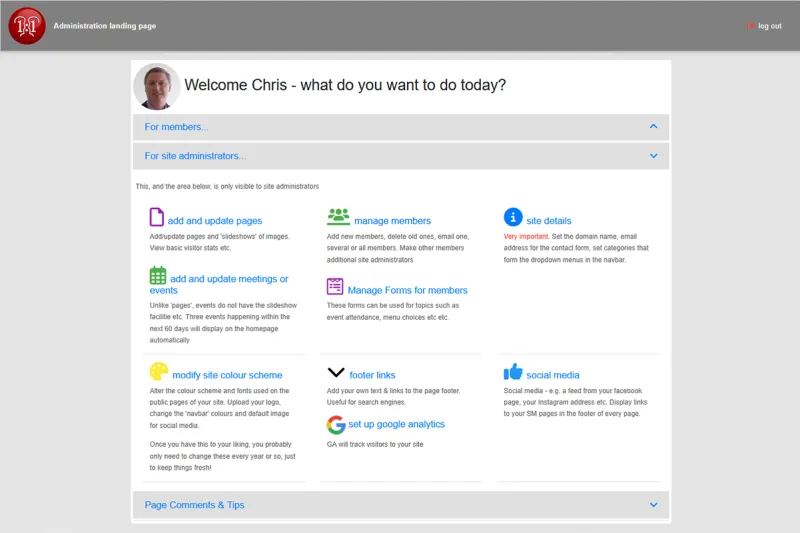
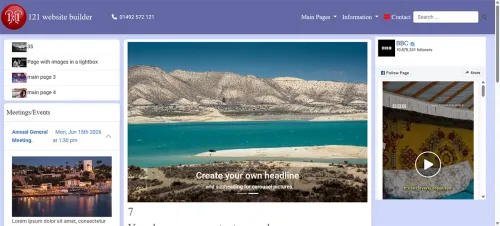
The 'main picture above shows the admin home page after logging in. Choose from those options to modify the things below:
- Set your site details - name, email address (not displayed anywhere, but required for the contact form to work)
- you define page categories. The pre-defined ones are 'main pages' and 'information', but you can rename these and add more if necessary.
- you add a page to a category. You give the page a title, a brief description of what the page is about and the page contents itself. 'Behind the scenes' an URL for the page is created, to help with search engine results e.g. yourdomain.com/this-is-the-page-url
- you add a headline 'main picture' to every page. This is resized and several copies are made for display at different sizes on different devices (phone, tablet etc) automatically in different areas of your website.
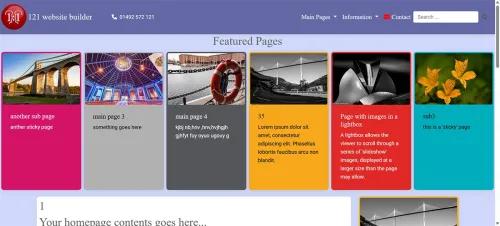
Pages in the 'main pages' category are displayed in a variety of ways on the homepage, automatically with the 'main picture' providing a link to the page itself. This is all done for you, without you needing to worry about formatting things for dfferent sized screens etc. All categories are displayed in the navbar at the top of the page, with a dropdown menu showing the pages in each category.
- You can easily alter the site's colour cheme at any time, though you may only want to change it every year or so, to keep things 'fresh'.
- Set your 'navbar' colours
- Upload your logo
You can now easily change the homepage format and appearance very easily - please see here, to suit how many 'main pictures', 'sticky' pages etc you have.
 The forms feature