 Web Hosting
  Website Design
  121 website builder template
  Domain name registration
 Your control panel
Refer to this page for the link on where to login to your web hosting control panel, where you can administer all aspects of your hosting plan from 121 Technology
Existing customers can login to their control panel here.
A screenshot is shown below.
Note that the user name is your email address.

The first time you log in, you are asked if you want to set up additional security measures. I shall not list them here.
The icons displayed in the control panel will depend on the type of webhosting package you have. For example, if you are on an email only package, you will see:
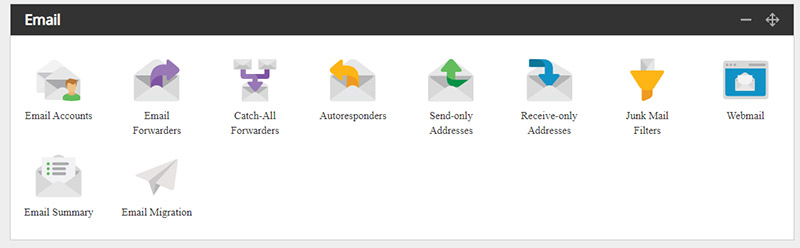 You will mainly use the first two icons:
Email accounts - set up email addresses that require a password and can be downloaded to our computer, iPad/iPhone etc using Outlook or another mail program.
Email forwarders - set up an address so that an mail sent to that address is automatically redirected to another address. For example mail sent to fred@yourdomain.com goes to fred@gmayl.com
You can also read your emails by clicking the 'Webmail' icon.
 Your control panel